BC Friday Tips #69 Item Blocked Fields
BC Friday Tips is here for msdyn365bc developers!
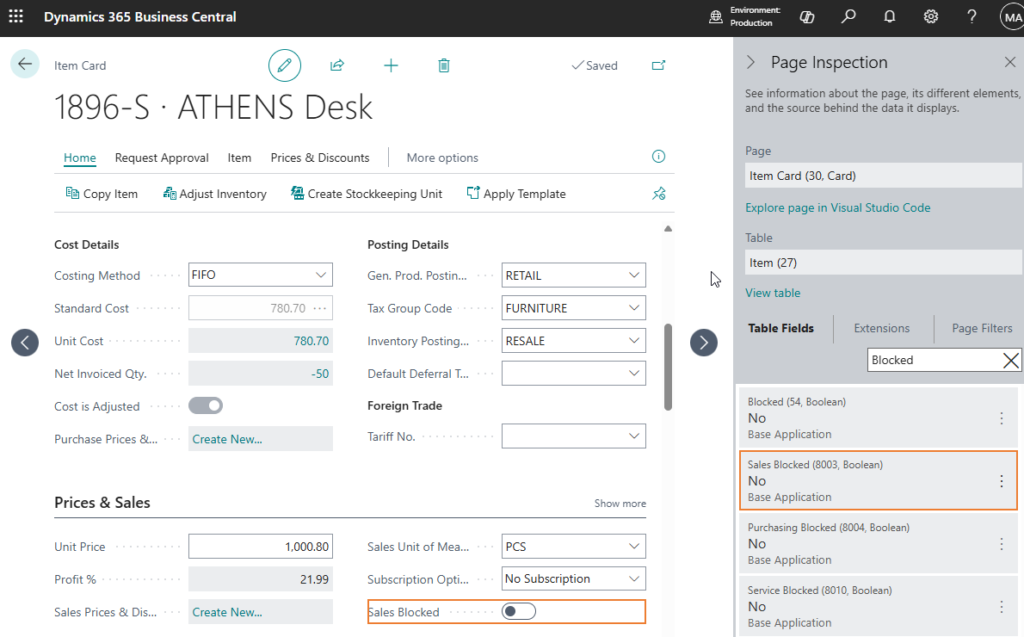
💡Did you know the Item table has multiple blocked fields?
Blocked.
Sales Blocked.
Purchasing Blocked.
Service Blocked.
If your code only checks the Blocked field, your logic can break.
You may allow actions that should be restricted, such as sales on items that are blocked for sales.
Other tables also use multiple blocked fields, such as the Item Variant table.
Why check all relevant fields?
✅ Prevent inconsistent behavior across modules
✅ Respect standard business logic
✅ Avoid bugs that only appear in certain cases
Always validate against the context.
Share to help others ♻️ and follow for more tips! 🚀