BC Friday Tips #71 BlankZero Property

BlankZero Property

BCFridayTips is here for msdyn365bc developers!

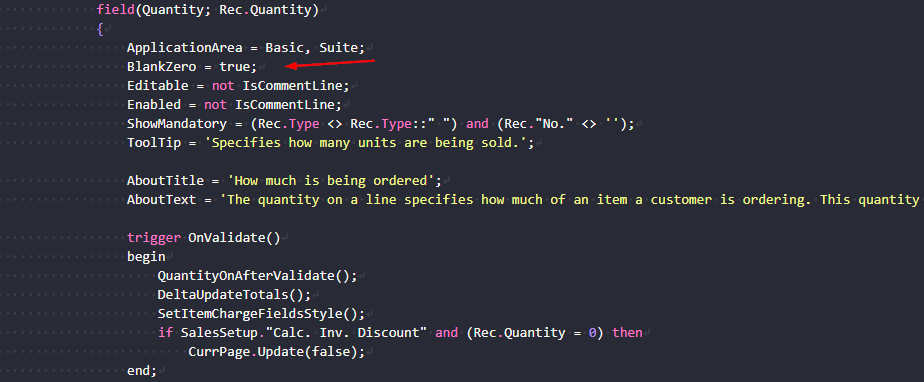
💡Did you know the BlankZero property can change how users see and enter numeric values?

By default, numeric fields show 0.
But sometimes, that adds noise and confusion, especially if the field is optional.

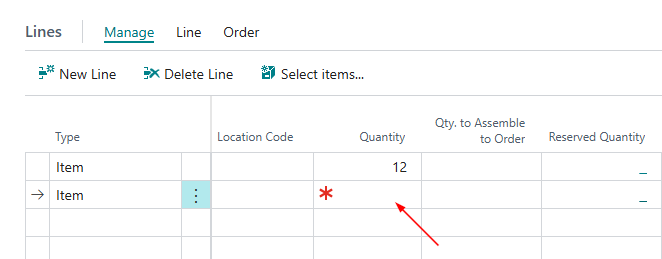
Set BlankZero = true to display empty instead of zero.

Why?
✅ Cleaner UI, less clutter
✅ Helps users focus on meaningful data

A small change can have a big impact on usability.

Share to help others ♻️ and follow for more tips! 🚀

BlankZero on Sales Order

thatnavguy

Experienced NZ-based NAV Developer and Consultant with 15+ years of experience leading multiple IT projects, performing business analyst, developing, implementing, and upgrading Dynamics NAV and Business Central. Passionate to deliver solution that focuses on user-friendly interface while keeping high standard of compliance with the needs.
You may also like...

Leave a Reply

Your email address will not be published. Required fields are marked *