BC Friday Tips #67 Reset Page Number in RDLC

BCFridayTips is here for msdyn365bc developers!

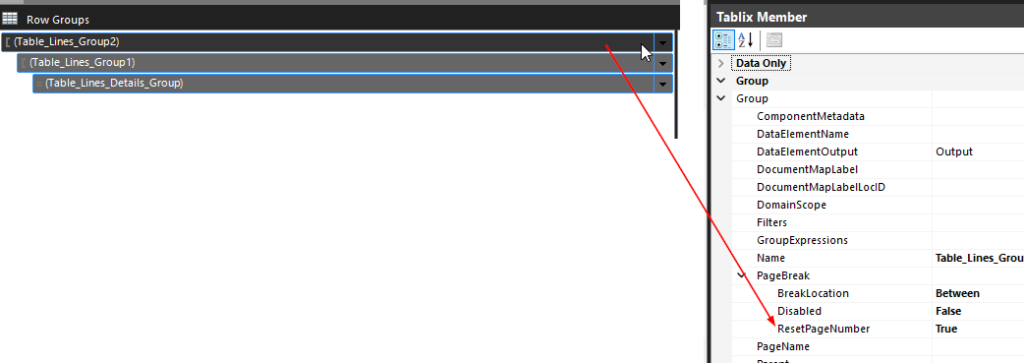
💡Need page numbers to restart per group in RDLC?

Use the ResetPageNumber property on your row group.

Set it to True. Done.

Why?
✅ Each group or document starts at Page 1
✅ Matches user expectations in reports

Share to help others ♻️ and follow for more tips! 🚀

thatnavguy

Experienced NZ-based NAV Developer and Consultant with 15+ years of experience leading multiple IT projects, performing business analyst, developing, implementing, and upgrading Dynamics NAV and Business Central. Passionate to deliver solution that focuses on user-friendly interface while keeping high standard of compliance with the needs.
You may also like...

Leave a Reply

Your email address will not be published. Required fields are marked *