BC Friday Tips #21 Understanding AppVersion and DataVersion
It’s BC Friday Tips time for Business Central developers.
💡 AppVersion vs DataVersion – Do You Know the Difference?
When working with extensions in Business Central, understanding AppVersion and DataVersion is important.
Key Behaviors:
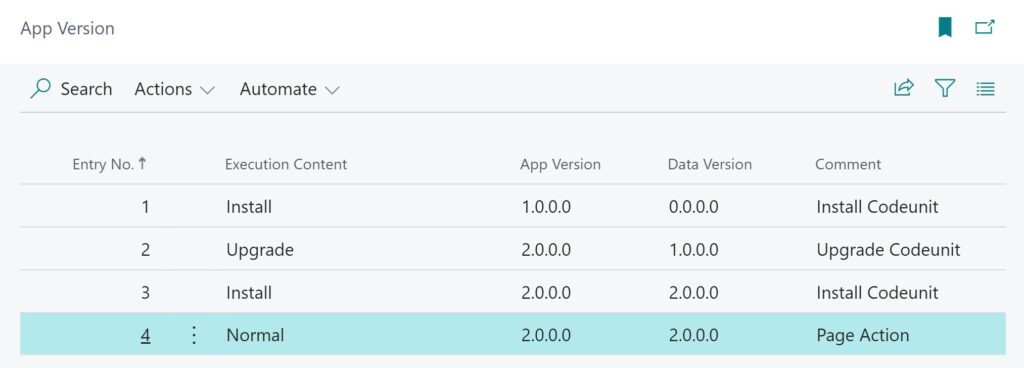
🔹 Fresh Install → AppVersion = New, DataVersion = 0.0.0.0
🔹 Upgrade → AppVersion = New, DataVersion = Previous version
🔹 Reinstall → Both versions the same version
Why does this matter?
✅ Ensures proper installation & upgrade handling
✅ Helps determine when to trigger data migration
For example, only migrate data when upgrading from version 2 or earlier:
procedure PerformDataMigrationWhenComingFromV2(CurrModuleInfo: ModuleInfo)

begin

  //Only do data migration when upgrading from version 2 and below

  if CurrModuleInfo.DataVersion.Major > 2 then

    exit;

  //Run Upgrade process

end;
For more detail, check out this blog post.