#BCFridayTips is here for #msdyn365bc developers!
💡 Did you know you don’t need to install a barcode font to develop barcodes on reports in BC SaaS?
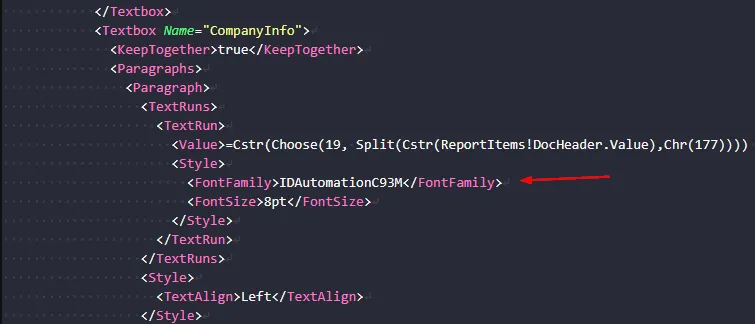
When you open an RDL file in VS Code, you can set the font name directly in the file.
Just find the text box in the RDL that should render as a barcode, and set the FontFamily to the correct font name.
For Code 93, that’s IDAutomationC93M.
You can look up the font name for any barcode type at idautomation.com/barcode-fonts, or just ask your AI assistant which font name to use for your barcode type.
Why does this matter?
✅ No need to install fonts in your computer.
✅ Works in SaaS out of the box.
If you want to learn more about how to create barcodes in BC, check out this post: Printing 1D and 2D Barcode.
Share to help others ♻️ and follow for more tips! 🚀