Last time we talked about getting OData Feeds into Excel, this time let’s talk about how to filter that OData Feeds.
When you connect and pull data using OData, it pulls ALL the records from the feed that you have selected. If you are dealing with large data, it is expensive to pull large data every single time you do the pull. Historical data such as ledgers can take from minutes to hours to pull it. It can be frustrating when you need to wait for a very long time, especially when you are planning to use only a small subset of the data.
There is also another case where you need to limit the data for security reason.
Regardless of the reasons, there is an advantage to be able to pull only the data you need. This can be achieved by using Filter Expression on the OData Feed.
To add a filter to OData, add $filter= at the end of the URL.
Let’s take an example of Vendor Ledger Entries OData. Below is the result if you pull the data as it is.
Let’s try pull only data for Vendor No. = 20000.
Original:
https://api.businesscentral.dynamics.com/v2.0/e6x7218c-xxxx-xxxx-xxxx-c9a01375b7f6/Sandbox/ODataV4/Company('CRONUS%20NZ')/VendorLedgerEntries
With Filter:
https://api.businesscentral.dynamics.com/v2.0/e6x7218c-xxxx-xxxx-xxxx-c9a01375b7f6/Sandbox/ODataV4/Company('CRONUS%20NZ')/VendorLedgerEntries**?$filter=Vendor_No eq '20000'**
We can see that it only pulls records with Vendor No. 20000.
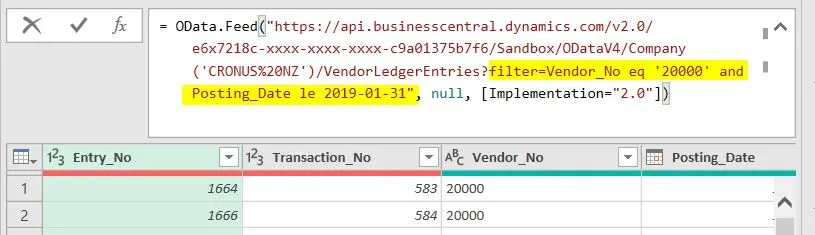
Let’s try putting more filter, such as any records with due date up to 31 January 2019.
Original:
https://api.businesscentral.dynamics.com/v2.0/e6x7218c-xxxx-xxxx-xxxx-c9a01375b7f6/Sandbox/ODataV4/Company('CRONUS%20NZ')/VendorLedgerEntries
With Filter:
https://api.businesscentral.dynamics.com/v2.0/e6x7218c-xxxx-xxxx-xxxx-c9a01375b7f6/Sandbox/ODataV4/Company('CRONUS%20NZ')/VendorLedgerEntries**?$filter=Vendor_No eq '20000' and Posting_Date le 2019-01-31**
If you want to limit the fields that you pull, you can use $select. Use & to combine $select and $filter.
Let’s try getting only Vendor No, Document No, and Posting Date fields. Less data is always good.
Original:
https://api.businesscentral.dynamics.com/v2.0/e6x7218c-xxxx-xxxx-xxxx-c9a01375b7f6/Sandbox/ODataV4/Company('CRONUS%20NZ')/VendorLedgerEntries
With Filter and Select:
https://api.businesscentral.dynamics.com/v2.0/e6x7218c-xxxx-xxxx-xxxx-c9a01375b7f6/Sandbox/ODataV4/Company('CRONUS%20NZ')/VendorLedgerEntries**?$select=Vendor_No,Document_No,Posting_Date&**$filter=Vendor_No eq '20000' and Posting_Date le 2019-01-31
If we try to do $select in Excel, it will return errors for each of the fields that you do not specify in the $select statement. You need to make sure to remove the Columns using Power Query Editor.
However, if you try to use the normal web services, you can see that it only pulls the specified fields.
Below are some of the list of filtering expressions that you can use.
You can refer Microsoft Docs to learn more about filtering.